
The Six Types of Stuff You Can Do With AI
Most of us still use AI as a glorified chatbot. Six categories of work you can hand it right now, in the week you are already having.
This is the second post in a series on AI Immersion, a framework for helping organisations move from curiosity to capability with AI, without feeling like an imposter from the IT department. If you missed the first post, it sets up why most AI adoption stalls and what we're trying to do differently. Start there if you want the full picture.
Last time we introduced two frameworks that sit at the heart of AI Immersion. Today we want to unpack the first one: The AI Tasks Framework.
The idea is simple. Most of us still use AI as a glorified chatbot. We want to reframe the question: what can people actually do with this stuff right now?
Not in theory. Not in a YouTube demo. In your actual working week.
Six types of AI work
We've landed on six categories, inspired by an OpenAI paper called Identifying and Scaling AI Use Cases. After running this with teams (most recently a big European insurer and a global B2B manufacturer) these are the buckets that keep proving useful. They're concrete enough to plan around and broad enough to cover most knowledge work.
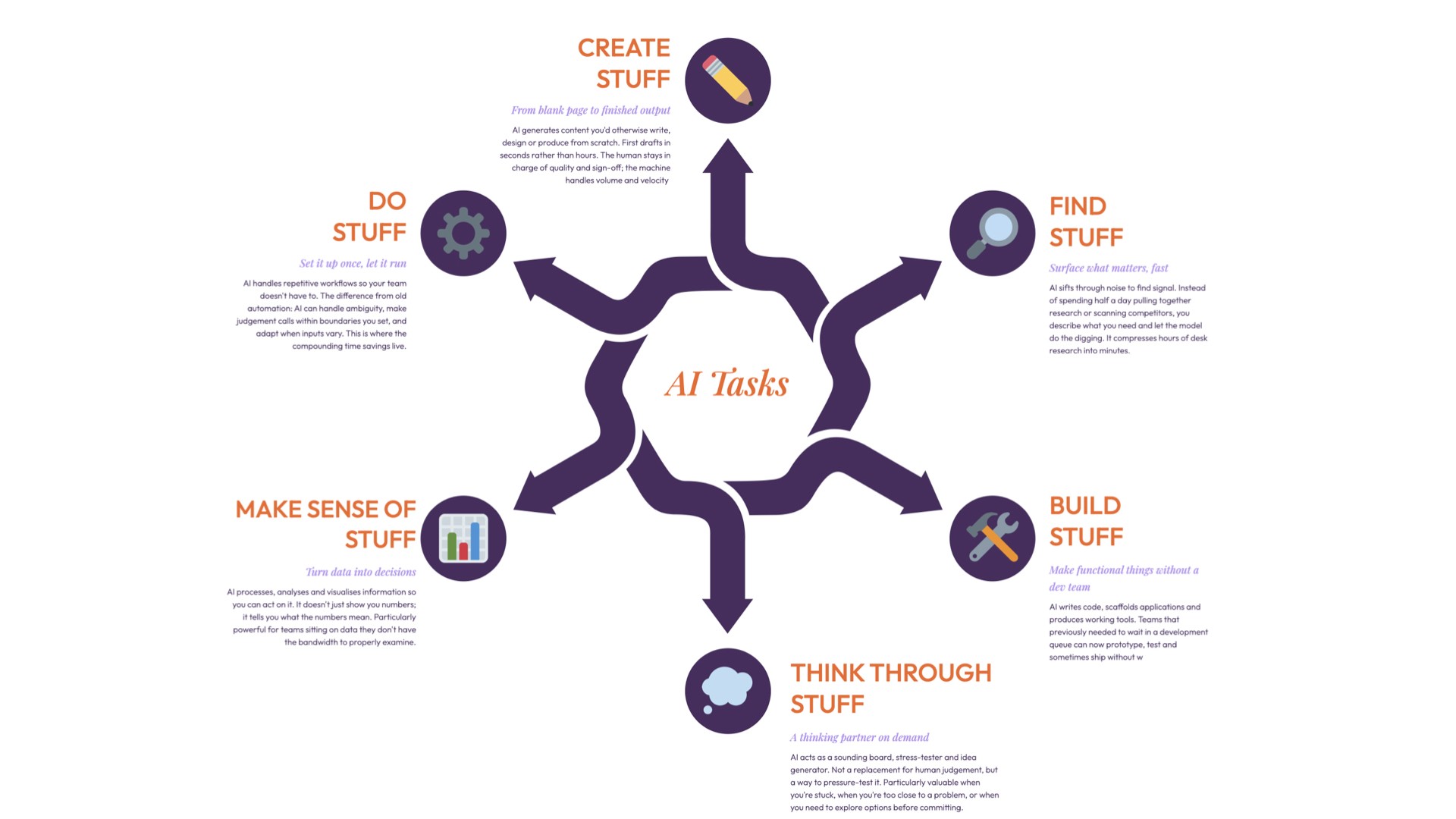
The framework unpacks six types of work tasks, or "Stuff." (Yes, that's the deeply technical term we've chosen.) We'll do a deeper dive on each in future posts, but here's the overview.
Find Stuff. Searching across documents, surfacing patterns in data, sourcing inventory, tracking down competitive intelligence. The gap between what search used to mean and what it means now is fundamentally under-appreciated. Tools like ChatGPT, Perplexity, NotebookLM, Microsoft Copilot and Alibaba's Accio have turned "searching" from keyword matching into a conversation with your own data.
Make Sense Of Stuff. Summarising long reports, comparing datasets, spotting anomalies, pulling themes from customer feedback. AI as a very fast, very patient research assistant. Claude, Gemini and ChatGPT all handle this well. Gemini can process video and audio natively, so "making sense" now extends to meeting recordings and customer calls, not just text.
Create Stuff. Drafting, writing, generating. First drafts of emails, reports, presentations, training materials, ad copy. This is the category most people think of first and it is useful, but it's also where quality control matters most. The output is a starting point. You're there to be the editor. The range has expanded fast: ChatGPT and Claude for writing, Midjourney and Adobe Firefly for images, Gamma for decks, Synthesia for video, Claude Cowork for polished documents and spreadsheets, Suno for music.
Build Stuff. This one surprises people. You can use AI to build functional tools: dashboards, simple apps, prototypes. Not production-grade software (usually), but working things that solve real problems. Replit, Lovable and Bolt turn natural language into deployed web apps. Claude Code and Cursor let developers build full applications through conversation. If you've never written a line of code you can build a fully operational app in an afternoon. That wasn't possible 18 months ago.
Think Through Stuff. AI as a thinking partner: pressure-testing assumptions, generating counter-arguments, mapping out scenarios, structuring messy problems. It's not that the AI thinks for you. It's that talking to it forces you to think more clearly. NotebookLM is particularly good here because it grounds the conversation in your source material rather than what the model was trained on. Nobody brags about using AI to think harder. But the people who do it tend to make better decisions.
Do Stuff. This is where the AI Tasks Framework starts pointing towards the next framework. The first five categories all follow the same pattern: you ask, AI delivers, you check. With "Do Stuff," the AI starts to act. Not just generate an output, but take steps, chain tasks together and make decisions within guardrails you set. OpenAI's Operator, Claude Code, Zapier, Microsoft Copilot Studio. The tools are evolving fast and the trajectory is clear. We'll get properly into agentic AI with the AI Actions Framework in the next post. For now, "Do Stuff" is the bridge. It's where tasks stop being one-shot and start becoming workflows.
How it works in practice
When we run an AI Immersion, each of the six task types gets its own mini sprint: a focused session, from 90 minutes to as much as half a day, where a team works through real examples using new tools.
The point isn't speed. It's coverage. By the end, you've got a practical map of where AI adds value in your specific context, built from direct experience rather than someone else's case study.
What we're still figuring out
The boundaries between these categories aren't always clean. "Find Stuff" bleeds into "Make Sense Of Stuff." "Build Stuff" often requires "Create Stuff" first. And "Think Through Stuff" sits underneath everything. We've gone back and forth on whether six is the right number. But every time we try to collapse them, we lose something useful. One team would never have explored "Build Stuff" if it hadn't been a distinct category. They didn't see themselves as builders. Giving it its own sprint gave them permission to try.
So for now, six it is. We're open to being wrong about that.
What's next
The AI Tasks Framework answers "what can we do?" The AI Actions Framework (next post) picks up where "Do Stuff" leaves off and gets properly into agentic AI: systems that don't just complete tasks but take actions, make decisions and run workflows. Together the two frameworks give you a practical starting point that doesn't require a six-month strategy project or a Chief AI Officer.
More on that soon.
If you're working through similar questions in your organisation, what types of AI work are landing well and what's falling flat? We're curious. The framework keeps evolving based on what people are actually experiencing.